
A Civil Service CV is a short, evidence-led document that matches the job advert and the Success Profiles. Many Civil Service Jobs applications also ask you to type your employment history and a statement of suitability into online boxes. This guide covers both routes, with a full CV example, a free Word and Google Docs template and advice on what to write in each box.
You will find a name-blind example, the template download and a plain-English explanation of how the application form differs from a CV. If you are applying for a specific role, read the advert alongside this guide.
Free download: Civil Service CV template (Word) or open the Google Docs version and make a copy to edit.
Do you need a CV for the Civil Service?
It depends on the advert. Many roles on Civil Service Jobs use an online application form instead of a CV upload. Others ask for a CV, a statement of suitability, or both. Check the “How to apply” section of the advert before you write anything.
Most forms ask for three things: your employment history, details of your skills and experience, and a statement of suitability (sometimes called a personal statement). The statement is where you match yourself to the person specification. For a step-by-step walk-through of the whole process, see our guide to applying for Civil Service jobs.
What goes in each part of a Civil Service application
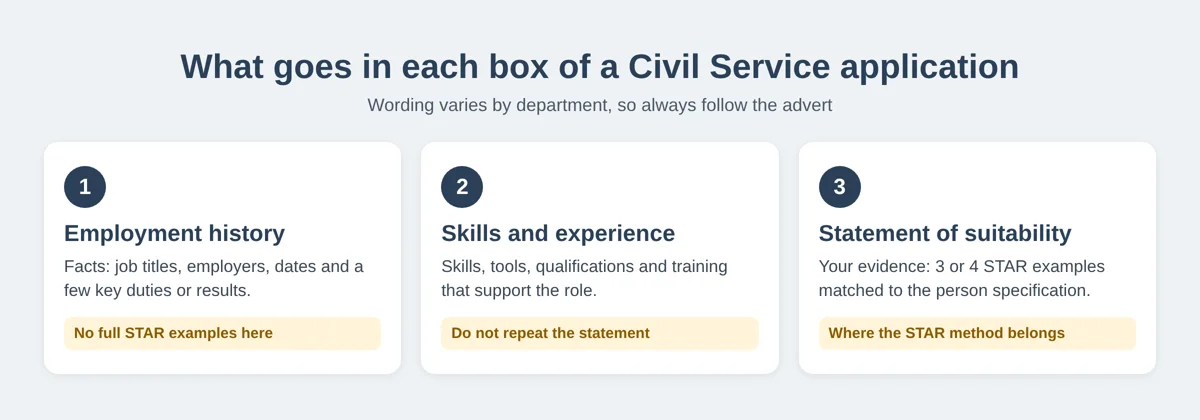
Readers often ask whether they should write a STAR example for every job in their employment history. You should not. STAR examples take too much space, and they belong where you are asked to prove you meet the criteria.
Employment history box
Treat this as a factual record. Give your job title, employer and dates, then two or three short lines on your main responsibilities and results. Include any gaps in plain terms. Keep your wording simple, because this box is rarely scored in depth.
Skills and experience box
Wording varies by department, so read the instruction under the box. In most cases it is meant for the skills, tools, qualifications, training and professional memberships that support your application. It is not the place to repeat your statement.
- List the technical skills and software the advert asks for.
- Add relevant qualifications, licences, security clearance and professional memberships.
- Point to roles in your employment history where you used each skill.
- Use short, factual lines rather than long paragraphs.
If the advert says the box is scored, treat it as evidence and write two or three concise examples. If it says nothing, a tidy skills summary is enough.
Statement of suitability (personal statement)
This is where STAR belongs. Choose three or four examples that match the essential criteria in the person specification, rather than one per job. Spend most of your word count on the criteria the advert says are assessed. Our guide to the Civil Service statement of suitability includes a full example.
Tips for plain text boxes
- Draft in Word first so you can count words and keep a copy.
- Paste in plain text. Bold, bullets and tables may be lost.
- Use full stops and short paragraphs, or a simple hyphen for lists.
- Check the pasted text for odd characters before you submit.
- Stay under the word or character limit, because text beyond it can be cut off.
Understanding Success Profiles
Civil Service roles are assessed using Success Profiles. Each advert tells you which of the five elements will be tested at each stage.
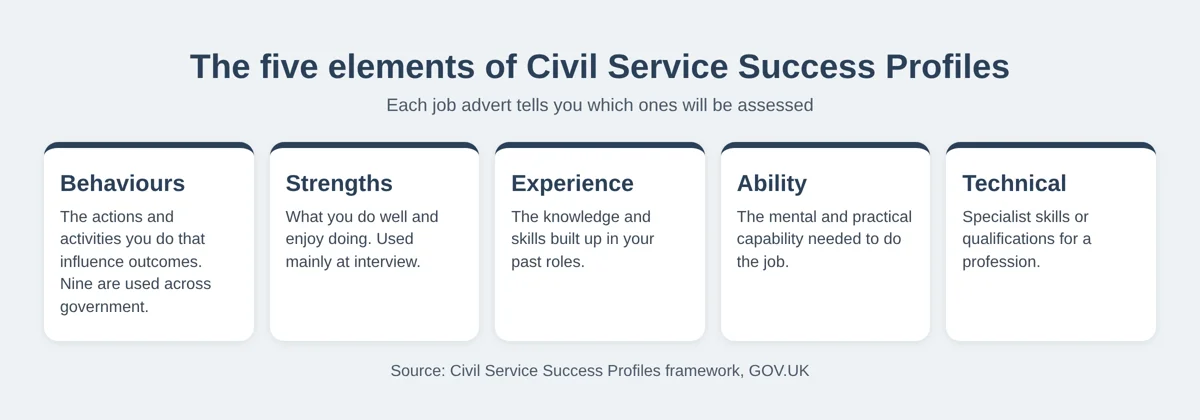
- Behaviours: the actions and activities that influence outcomes. There are nine, such as Communicating and Influencing and Delivering at Pace.
- Strengths: what you do well and enjoy doing. These are usually assessed at interview.
- Experience: the knowledge and skills you have built in past roles.
- Ability: the mental and practical capability needed to do the job.
- Technical: specialist skills or qualifications for a profession.
Most CV and statement work is aimed at Behaviours and Experience. For the full list, read our guide to the Civil Service behaviours framework.
What to include in a Civil Service CV
When a CV is requested, keep it to two pages and tailor it to the advert. Use this order.
| Section | What to include |
|---|---|
| Header | A plain line such as “Application for Policy Officer, Department for Education” and the job reference. No name, photo or date of birth if the process is name-blind. |
| Professional summary | Three or four sentences covering your field, years of experience and strongest relevant evidence. |
| Key skills | Five or six skills taken from the advert, plus the behaviours you can evidence. |
| Employment history | Reverse chronological order, with result-led bullets for your most recent roles. |
| Education | Qualifications and relevant training, with years only. |
| Additional information | Security clearance, languages, IT skills and professional memberships. |
Name-blind and anonymised CVs
Many departments remove names and personal details before the first sift. Leave out your name, address, date of birth and photo unless the advert asks for them. Keep the rest of the layout plain so nothing important is lost when the document is processed. Our guide to the anonymised CV in the UK covers this in more detail.
Formatting that works
- Use a Word document (.docx) unless the advert asks for another format.
- Choose a clear font such as Arial or Calibri at 10 to 12 point.
- Keep a single-column layout with standard headings.
- Avoid text boxes, graphics and information inside headers or footers.
- Name the file clearly, for example Policy_Officer_CV.docx, without your name if the process is name-blind.
How to write each CV section
Professional summary
Write three or four sentences in the third person without using “I”. Name your field, state your experience and give one or two pieces of evidence that match the advert. Avoid phrases such as “hard-working team player”. For more help, see our guide on how to write a CV profile.
Employment history and the STAR method
STAR stands for Situation, Task, Action and Result. In a CV, use it as a thinking tool rather than a label. Write each bullet so it shows what you did and what changed, and do not type the letters S, T, A and R into your CV.
- Weak: Responsible for writing briefings for senior staff.
- Better: Wrote 30+ briefings for ministerial meetings and cut clearance time by a third by introducing a shared template.
Use two or three result-led bullets for each recent role. For more on structure and length, see how to write your employment history on a CV.
Skills and behaviours
Pick five or six skills from the advert and match your wording to it. If the advert lists behaviours, name the ones you can evidence and make sure your bullets back them up.
Education and additional information
List your highest qualification first, with the subject, institution and year. Add security clearance, languages and IT skills below. Leave out your date of birth and marital status.
Civil Service CV example (UK, 2026)
This example is written for a mid-level policy role and is fully anonymised. Notice how each bullet shows a result and how nothing identifies the candidate.
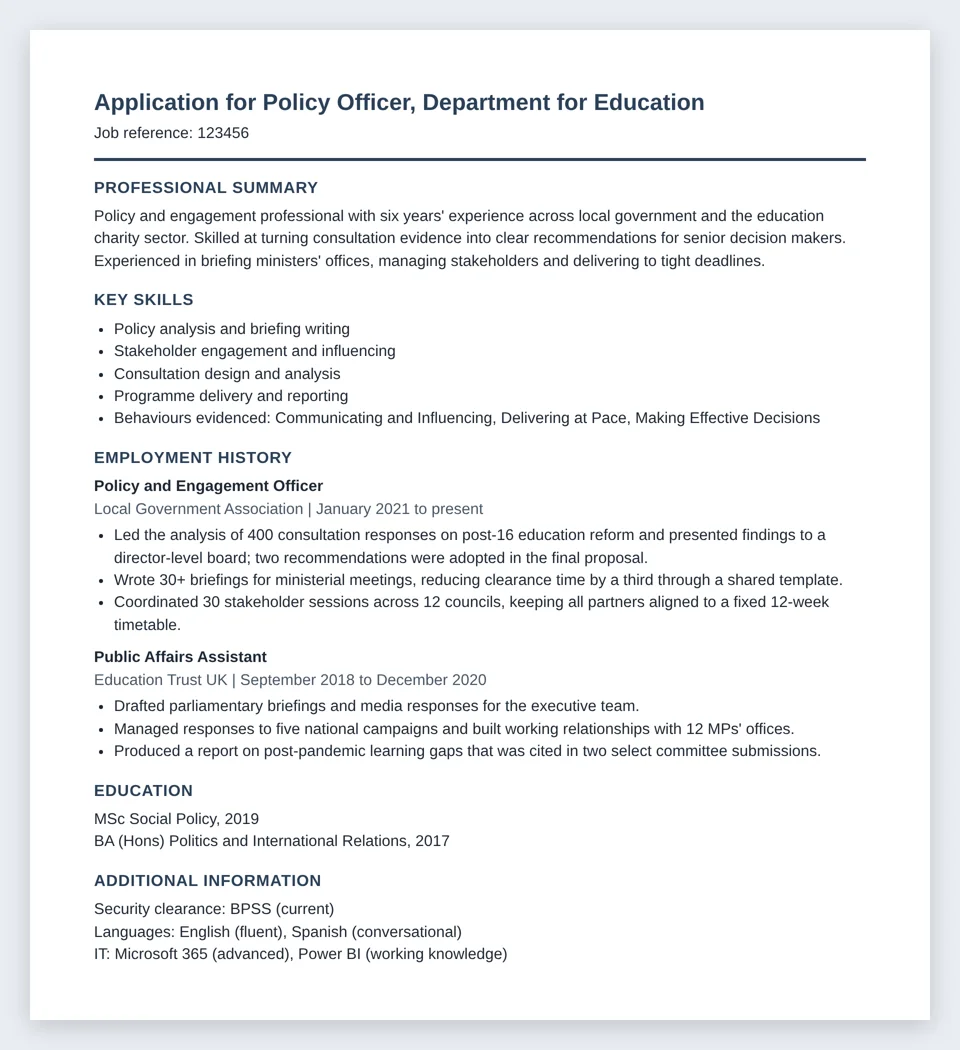
The Word template below follows the same layout. The wording in the example is a model only. Use your own evidence and the language of your advert.
Free Civil Service CV template (Word and Google Docs)

The template follows the structure in the example above and is plain enough to survive anonymised screening. It has placeholder headings, prompts for result-led bullets and a name-blind header.
- Download the Civil Service CV template (Word)
- Open the Google Docs version and choose File, then Make a copy.
Once your CV is ready, you can search live vacancies on the official Civil Service Jobs portal.
How to use the template
- Read the full job advert and note the behaviours and skills it lists.
- Replace each placeholder with your own details.
- Write result-led bullets for your recent roles.
- Delete every line of example or guidance text.
- Save the file with a clear name and check it for typos.
Common Civil Service CV mistakes
- Sending the same CV to every role. Each advert assesses different behaviours, so tailor your CV every time.
- Listing duties instead of results. Show what changed because of your work.
- Ignoring the person specification. Every essential criterion needs evidence somewhere in your application.
- Repeating yourself across boxes. Use the employment history for facts and the statement for proof.
- Leaving in personal details. Remove your name, photo and date of birth if the process is name-blind.
- Skipping the proofread. Read the final text aloud and run a spellcheck before you submit.
Civil Service CV FAQs
Do I need a CV for a Civil Service application?
It depends on the advert. Many roles use an online application form instead of a CV upload, and others ask for a CV, a statement of suitability or both. Check the how to apply section of the advert.
Should I use a STAR example for every job in my employment history?
No. Keep your employment history factual, with job titles, dates and a few key results. Use STAR examples in your statement of suitability, matched to the essential criteria in the person specification.
What should I put in the skills and experience box?
Use it for the skills, tools, qualifications, training and memberships that support the role, unless the advert says it is scored. Do not repeat your statement. If the box is scored, write two or three concise examples.
Do I need to anonymise my Civil Service CV?
Often, yes. Many departments use name-blind recruitment, so leave out your name, address, date of birth and photo unless the advert asks for them.
How long should a Civil Service CV be?
Two pages is the usual maximum. Junior roles can be shorter if the content is relevant and tailored.
What is the STAR method?
STAR stands for Situation, Task, Action and Result. It is a way of structuring evidence so that it shows the context, your role, what you did and the outcome.
Should I send a cover letter with my Civil Service CV?
Only if the advert asks for one. Many applications use a statement of suitability instead, so follow the instructions on the advert.
Can I use the same CV for several Civil Service roles?
You can reuse the structure, but tailor the summary, skills and bullets to each advert and its Success Profiles elements.
Next steps
Choose the right route for your advert, match your evidence to the person specification and proofread before you submit. If you would like expert help, our cover letter service and CV reviews are built for competitive applications.
Book a free CV review and we will tell you what to improve before you apply.
Recent Comments