
Writing a strong IT CV is not just about listing every tool, platform or programming language you have used. UK recruiters and hiring managers want to see what you can do with that technical knowledge: the systems you have supported, the environments you have worked in, the problems you have solved, and the outcomes you have delivered.
That applies whether you are writing an IT support CV, software engineer CV, infrastructure CV, cyber security CV, cloud CV, data CV or technology leadership CV. The details will change by role type, but the principle stays the same: your CV needs to connect technical capability with evidence of impact.
A weak IT CV often reads like a technical inventory. A strong IT CV shows relevance, scope and proof. It makes it easy for a recruiter to understand your level, your technical fit, your commercial awareness and the value you could bring to the next employer.
This guide explains how to structure an IT CV for the UK market, what keywords to include, how to write a stronger profile, and how to turn task-based bullets into achievement-led examples. If you already have an IT CV but are not sure whether it is working hard enough, you can also request a free CV review for a practical outside view.
IT CV: key takeaways
A strong IT CV should make your technical value clear quickly. Before you worry about design, templates or wording, check whether your CV answers these points:
- What type of IT role are you targeting? Make your direction obvious, whether that is IT support, software engineering, cloud, infrastructure, cyber security, data, project delivery or IT leadership.
- Which technologies matter most for the role? Prioritise relevant tools, platforms, systems, frameworks and methodologies instead of listing everything you have ever touched.
- Where have you used those technologies? Add context such as user numbers, ticket volumes, system scale, cloud environments, security requirements, budgets, teams or business-critical systems.
- What problems have you solved? Recruiters want evidence of troubleshooting, improvement, delivery, automation, risk reduction, migration, stabilisation or user support.
- What changed because of your work? Include measurable outcomes such as improved uptime, faster response times, reduced incidents, lower costs, better adoption, stronger controls or smoother delivery.
- Is your CV easy for ATS and humans to read? Use clear headings, a clean structure, relevant keywords and achievement-led bullet points rather than graphics-heavy formatting.
- Does your CV match the seniority of the role? A hands-on analyst CV should show technical problem-solving. A Head of IT or IT Director CV should also show strategy, governance, budgets, vendors, teams and business outcomes.
What makes a strong IT CV in the UK?
A strong IT CV shows more than technical familiarity. It shows where you have used your skills, what level of responsibility you held, and how your work improved systems, services, delivery or decision-making.
The basic structure still matters. A UK CV normally needs clear contact details, a focused profile, relevant work history, education, qualifications and supporting information. The National Careers Service guidance on CV sections is a useful reference point for the standard building blocks. For IT candidates, however, the real difference is how those sections are used.
Your CV needs to answer four questions quickly:
- What kind of IT professional are you? For example: IT Support Analyst, Infrastructure Engineer, Software Developer, Cyber Security Analyst, Cloud Engineer, Data Analyst, IT Project Manager or Head of IT.
- What technical environment have you worked in? This may include Microsoft 365, Azure, AWS, Linux, Windows Server, Cisco, VMware, SQL, Python, JavaScript, ServiceNow, Jira, Kubernetes, SIEM platforms, ERP systems or sector-specific tools.
- What level of responsibility have you carried? Recruiters need to understand whether you supported 80 users or 8,000, maintained a small internal network or led a multi-site migration, contributed to code fixes or owned full-stack delivery.
- What evidence proves your value? Strong IT CVs use outcomes: reduced downtime, faster ticket resolution, improved deployment frequency, stronger security controls, lower cloud spend, better user adoption or successful project delivery.
A useful definition is this:
A strong IT CV presents technical skills in context. It shows the technology used, the environment, the problem, the action taken and the measurable result.
That distinction is important. “Azure, PowerShell, Intune, Active Directory” is a skills list. “Automated Microsoft 365 user provisioning using PowerShell and Intune, reducing manual account setup time across a 600-user environment” is evidence.
The more competitive the role, the more this matters. Many IT candidates have similar-looking tools and certifications. What separates them is the quality of proof behind those keywords.
What recruiters scan first on an IT CV
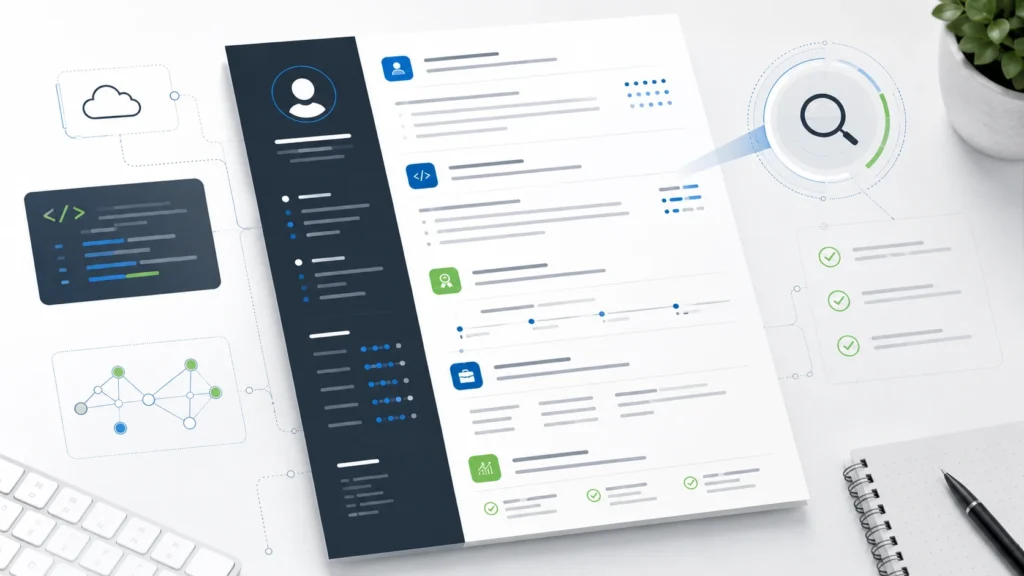
Most recruiters do not read an IT CV slowly from top to bottom on first review. They scan for fit. Your job is to make the right evidence visible before they have to work for it.
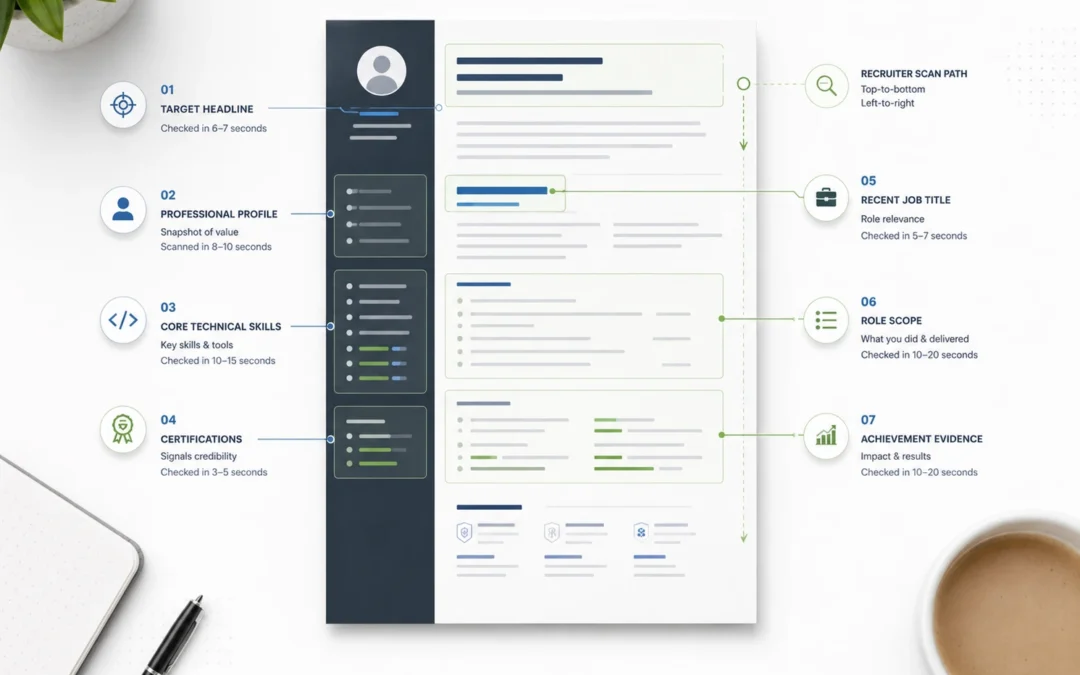
The first scan usually focuses on:
- Current or most recent job title — does your background broadly match the level and role family?
- Target direction — is it clear whether you are aiming for support, engineering, security, cloud, data, delivery or leadership?
- Core technical stack — are the required tools, systems, languages or platforms visible near the top?
- Certifications and qualifications — do you have relevant credentials such as ITIL, Microsoft, AWS, Azure, Cisco, CompTIA, CISSP, PRINCE2, Scrum or degree-level study?
- Scale of environment — how many users, devices, servers, applications, locations, tickets, releases, datasets, projects or systems have you supported?
- Evidence of delivery — have you solved problems, improved services, completed migrations, reduced incidents, automated processes or contributed to measurable outcomes?
- Communication and stakeholder exposure — have you supported users, managed suppliers, worked with product teams, explained technical issues, trained colleagues or influenced senior stakeholders?
- Sector or domain context — finance, healthcare, education, SaaS, retail, government, consultancy and managed services can all shape how your experience is read.
This is why the top third of your CV is so important. If your profile is generic, your skills section is cluttered, and your achievements are buried on page two, the reader may not see your strongest evidence.
For most IT CVs, the top section should give the recruiter three things immediately: your role identity, your technical fit and your strongest proof of impact.
IT CV structure: copy/paste template for UK technology roles
A good IT CV needs a clear structure before it needs clever wording. The aim is to help recruiters find the right evidence quickly: your technical stack, level of responsibility, project exposure, service environment, certifications and measurable outcomes.
For most UK IT roles, a two-page CV is usually the right target. Senior technology leaders, contractors with complex project histories, or specialists with deep technical delivery may need more careful editing, but length should still be controlled. The structure below works for most hands-on, technical-adjacent and leadership roles.
You can also compare this with a broader ATS-friendly UK CV template if you want a clean formatting structure before tailoring the content.
Copy/paste IT CV structure
Name
Town/city or region | Phone | Email | LinkedIn | Portfolio/GitHub/personal site if relevant
Target headline
Example: IT Support Analyst | Infrastructure Engineer | Software Engineer | Cyber Security Analyst | Cloud Engineer | IT Project Manager | Head of IT
Professional profile
Three to five lines summarising your role identity, technical domain, level of experience, strongest evidence and target direction.
Core technical skills
Group your most relevant tools, systems and platforms by category. For example:
- Operating systems:
- Cloud platforms:
- Networking:
- Security:
- Programming / scripting:
- Databases:
- Service management:
- Project / delivery tools:
- Business systems:
Do not turn this section into a long keyword dump. Prioritise the technologies that match the jobs you are applying for.
Certifications and training
Include relevant certifications such as ITIL, Microsoft, Azure, AWS, Cisco, CompTIA, VMware, CISSP, CISM, PRINCE2, Agile or Scrum. If a certification is in progress, say so clearly.
Career history
List roles in reverse chronological order. For each role, include:
- Employer name
- Job title
- Dates
- One or two lines of context
- Achievement-led bullets
The context line is especially useful in IT because it helps the reader understand scale. For example:
“Supported a 900-user multi-site environment across Microsoft 365, Windows Server, Azure AD, Intune and ServiceNow, providing 1st–3rd line support across infrastructure, applications and endpoint management.”
Additional Sections
Selected projects
This section is optional, but it can be powerful for software, cloud, infrastructure, cyber security, data and transformation roles. Use it when project work is stronger than day-to-day job descriptions.
For each project, include the technology, scope, your contribution and the result. Avoid writing a long case study.
Education
Include degrees, diplomas, apprenticeships or relevant technical study. Early-career candidates can give this more space. Experienced candidates should usually keep it concise.
Additional information
Use this only for relevant details: right to work, languages, professional memberships, publications, technical communities or volunteering. Avoid clutter.
This structure gives your IT CV a logical order: who you are, what you know, where you have used it, and what changed because of your work. That is far stronger than opening with a generic profile and then expecting the reader to piece the evidence together.
How to write a strong IT CV profile
Your IT CV profile should help the reader understand your fit within a few seconds. It is not a personal statement in the school or university sense, and it should not be a list of soft skills. It should position you clearly for the type of role you want next.
A strong IT CV profile usually covers five points:
- your role identity
- your technical specialism or environment
- your level of experience
- one or two strong proof points
- your target direction
A simple formula is:
Role identity + technical domain + environment/scope + evidence of impact + target role direction.
For example, instead of writing:
“Hard-working IT professional with excellent communication skills and a passion for technology.”
write something more specific:
“IT Support Analyst with four years’ experience supporting Microsoft 365, Windows 11, Active Directory, Intune and ServiceNow across multi-site professional services environments. Confident handling 1st and 2nd line tickets, onboarding users, resolving access issues and improving support documentation. Now seeking a broader infrastructure-focused role with greater exposure to endpoint management, cloud administration and service improvement.”
The purpose of a strong profile
That profile gives the recruiter useful information. It shows role level, tools, environment, responsibilities and direction. It also avoids empty claims such as “hard-working”, “dynamic” or “team player”.
For more technical roles, the profile should still be readable to a non-specialist recruiter. You can include technologies, but do not overload the opening paragraph with acronyms. A software engineer might mention the core stack, product environment and delivery style. A cyber security analyst might mention monitoring, incident response, vulnerability management and risk reduction. A cloud engineer might mention platforms, migration, automation, infrastructure as code and operational reliability.
The Prospects technical CV example is a useful reminder that technical CVs need to show relevant systems, packages, languages and practical capability. The key is to present those details in a way that supports your target role, rather than making the recruiter decode a long technical inventory.
Your profile should not try to tell your whole career story. It should create a strong first impression and guide the reader into the rest of the CV.
A good test is this: if someone reads only your profile and skills section, would they know what role you are suitable for, what technical environment you know, and why your experience is credible?
If the answer is no, the profile is probably too vague.
IT CV profile examples by role type and seniority
The best IT CV profile depends on the role you are targeting. A support analyst, software engineer, cyber security specialist and Head of IT should not sound the same. Each profile needs to reflect the right blend of technical depth, operating context and value.
Use the examples below as models, not fixed templates. The strongest version will always be adapted to your actual experience and the role you are applying for.
IT Support Analyst CV profile example
IT Support Analyst with four years’ experience providing 1st and 2nd line support across Microsoft 365, Windows 11, Active Directory, Intune and ServiceNow environments. Experienced in resolving access, hardware, software, networking and endpoint issues for multi-site user bases, with a strong record of improving support documentation and reducing repeat tickets. Now seeking a broader technical support role with increased exposure to cloud administration, endpoint management and service improvement.
Infrastructure Engineer CV profile example
Infrastructure Engineer with experience supporting Windows Server, VMware, Azure, Active Directory, Group Policy, backup solutions and networked environments across business-critical operations. Confident maintaining availability, troubleshooting incidents, supporting migrations and improving resilience across hybrid infrastructure. Brings a practical mix of hands-on technical capability, vendor coordination and stakeholder communication, with a focus on stable, secure and scalable IT services.
Software Engineer CV profile example
Software Engineer with experience building and maintaining web applications using JavaScript, TypeScript, React, Node.js and SQL within Agile product teams. Skilled in developing clean, maintainable code, integrating APIs, improving application performance and contributing to release planning, testing and code review. Particularly strong in translating user requirements into reliable technical solutions and collaborating with product, design and QA teams to improve delivery quality.
Cyber Security Analyst CV profile example
Cyber Security Analyst with experience across security monitoring, vulnerability management, incident triage, phishing investigation and control improvement. Familiar with SIEM tooling, endpoint protection, access management, risk documentation and security awareness support. Able to combine technical analysis with clear reporting, helping organisations identify threats, respond to incidents and strengthen their overall security posture.
Cloud / DevOps Engineer CV profile example
Cloud and DevOps Engineer with experience supporting Azure and AWS environments, CI/CD pipelines, infrastructure as code, containerisation and automation. Skilled in improving deployment reliability, streamlining environment management and supporting cloud migration or modernisation initiatives. Combines scripting capability with operational awareness, helping teams deliver faster while maintaining security, resilience and cost control.
Data Analyst / BI CV profile example
Data Analyst with experience using SQL, Power BI, Excel, Python and dashboarding tools to turn operational and commercial data into actionable insight. Confident extracting, cleaning and analysing datasets, building reports, improving data quality and presenting findings to non-technical stakeholders. Brings a strong understanding of how accurate reporting supports better decisions, process improvement and performance visibility.
IT Project Manager CV profile example
IT Project Manager with experience delivering system implementations, infrastructure upgrades, application rollouts and business change across cross-functional environments. Skilled in planning, RAID management, stakeholder engagement, supplier coordination, UAT, governance and benefits tracking. Able to bridge technical and business teams, keeping delivery focused on scope, risk, adoption and measurable outcomes.
IT Manager / Head of IT CV profile example
IT Manager with experience leading service delivery, infrastructure, suppliers, budgets and technology improvement across growing organisations. Combines hands-on technical understanding with broader responsibility for IT strategy, governance, cyber resilience, user support and operational performance. Strong track record of improving service quality, strengthening controls and aligning technology decisions with business priorities.
The pattern across these examples is deliberate. Each profile gives the reader a clear role identity, relevant technical context and a sense of value. None of them relies on vague claims such as “excellent communicator” or “passionate about technology”. Those qualities may be true, but they are far stronger when shown through evidence.
The IT proof framework: technology, scope, problem and result
One of the fastest ways to improve an IT CV is to stop writing bullets that only describe tasks.
Many IT candidates write things like:
“Responsible for supporting Microsoft 365 and resolving user issues.”
That tells the recruiter what the job involved, but it does not show how well you performed, what kind of environment you worked in, or why the work mattered.
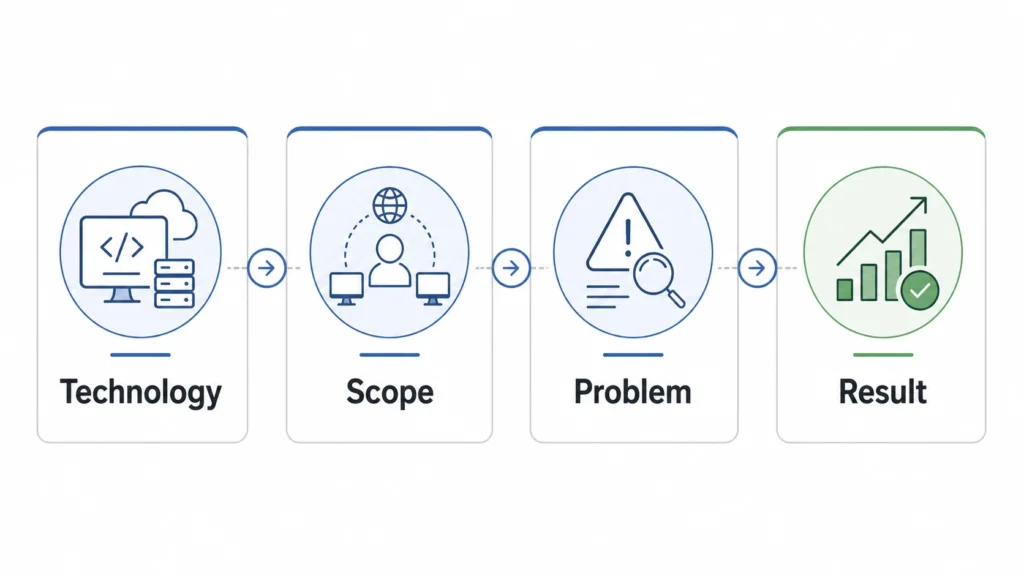
A stronger IT CV bullet usually combines four elements:
Technology + scope + problem + result
You can expand that into a simple working formula:
Used [technology/tool/method] across [environment/scope] to solve [problem], resulting in [measurable or observable improvement].
For example:
“Used PowerShell and Intune to automate user onboarding across a 500-user Microsoft 365 environment, reducing manual setup time and improving consistency for new starters.”
This works because it gives the reader useful evidence. They can see the technology, the scale, the business need and the outcome.
The same framework can be adapted across different IT roles:
IT Roles Examples
IT support example
Resolved recurring Microsoft 365 access and mailbox issues across a 300-user environment, improving first-contact resolution and reducing repeat tickets through clearer troubleshooting documentation.
Infrastructure example
Supported the migration of on-premise servers to Azure across three business sites, improving resilience, simplifying backup processes and reducing reliance on legacy hardware.
Software engineering example
Refactored legacy API integrations within a React and Node.js application, improving page performance and reducing avoidable support issues raised by customer-facing teams.
Cyber security example
Investigated phishing alerts and endpoint security incidents using SIEM and EDR tooling, supporting faster triage, clearer escalation and improved user awareness across the business.
Cloud / DevOps example
Improved CI/CD pipeline reliability using GitHub Actions and Terraform, reducing deployment failures and helping developers release changes with greater consistency.
IT leadership example
Led a service improvement programme across infrastructure, support and suppliers, strengthening governance, reducing operational risk and improving user confidence in IT delivery.
This approach also helps you avoid the common mistake of separating “technical skills” from “value”. It is fine to list your tools in a skills section, but the career history needs to prove that you have used them in meaningful contexts.
Frameworks such as SFIA can also be useful when thinking about skills at different levels of responsibility. The same keyword can mean very different things depending on whether you used it as a junior analyst, senior engineer, project lead, architect or IT director.
That is why your CV should not simply say what you know. It should show the level at which you have applied it.
Before-and-after IT CV bullet rewrites
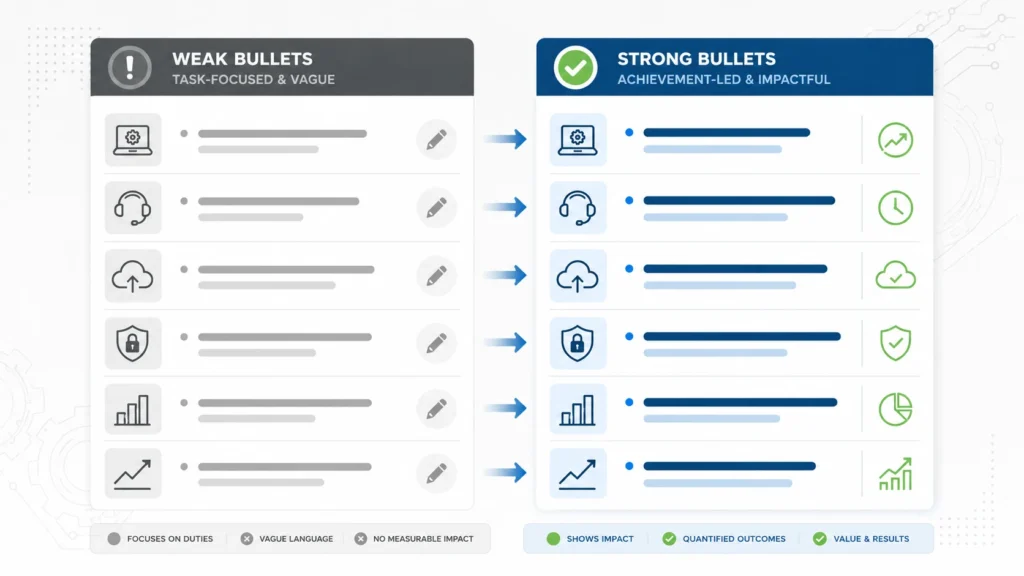
Achievement-led bullet points are one of the most important parts of an IT CV. They show how your technical work translated into service improvement, delivery progress, risk reduction, cost control or better user experience.
The examples below show how to turn vague, task-based wording into stronger evidence.
IT support
Before:
Responsible for dealing with IT tickets and helping users with technical issues.
After:
Resolved 1st and 2nd line support tickets across Microsoft 365, Windows, Active Directory and hardware environments, improving user confidence through clear communication, faster triage and better knowledge-base documentation.
Service desk improvement
Before:
Worked on the IT service desk and answered user queries.
After:
Handled high-volume service desk requests across access, software, hardware and network issues, helping reduce repeat queries by documenting common fixes and improving first-contact guidance for users.
Infrastructure
Before:
Maintained servers and supported the network.
After:
Supported Windows Server, VMware and network infrastructure across a multi-site environment, resolving availability issues, coordinating backups and contributing to improved system resilience.
Cloud migration
Before:
Helped with cloud migration project.
After:
Supported the migration of legacy services into Azure, assisting with user access, testing, documentation and post-go-live support to reduce disruption during transition.
Software engineering
Before:
Developed features and fixed bugs.
After:
Developed and maintained application features using React, Node.js and SQL, resolving defects, improving code quality and supporting smoother releases through testing, peer review and Agile sprint delivery.
DevOps / automation
Before:
Worked on pipelines and automation.
After:
Improved CI/CD pipeline reliability using GitHub Actions and infrastructure-as-code principles, reducing manual deployment steps and helping development teams release changes more consistently.
Cyber security
Before:
Monitored security alerts and responded to incidents.
After:
Investigated SIEM and endpoint security alerts, triaged phishing attempts and escalated high-risk incidents, supporting faster response and improved security awareness across the organisation.
Data / analytics
Before:
Created reports for management.
After:
Built Power BI dashboards and SQL reports to improve visibility of operational performance, enabling managers to identify trends, track service issues and make faster evidence-based decisions.
IT project delivery
Before:
Managed IT projects and worked with stakeholders.
After:
Coordinated system rollout activity across technical teams, suppliers and business users, managing risks, testing, communications and adoption support to keep delivery aligned with agreed milestones.
IT management
Before:
Managed the IT team and suppliers.
After:
Led IT service delivery across internal support, infrastructure and third-party suppliers, strengthening governance, improving escalation processes and aligning technology priorities with operational needs.
The stronger versions do not just add more words. They add context. They show tools, scale, responsibility and impact.
When rewriting your own IT CV bullets, look for task phrases such as:
- “responsible for”
- “worked on”
- “helped with”
- “involved in”
- “dealt with”
- “managed systems”
- “provided support”
Then ask:
- What technology did I use?
- Who or what did I support?
- What problem was I solving?
- What improved as a result?
- Can I add a number, scale or outcome?
Not every bullet needs a metric. Some outcomes are qualitative, especially in support, security, stakeholder management or early-stage project work. But every bullet should still give the reader a reason to believe you can do the job.
IT CV keywords and skills bank by role type
IT CV keywords matter because they help recruiters and ATS systems understand your fit. But keywords only work properly when they are relevant, specific and backed up by evidence.
Do not copy every keyword you find in a job advert. Instead, look for the terms that genuinely match your experience, then show where you have used them. A skills section might help you pass the first scan, but your career history needs to prove capability.
The table below gives examples of useful keyword areas by role type. Treat it as a starting point, not a fixed list.
Keyword areas by role type
| Role type | Useful keyword areas | Proof to include |
|---|---|---|
| IT support / service desk | 1st line support, 2nd line support, Microsoft 365, Windows, Active Directory, Intune, ServiceNow, Jira Service Management, hardware, software, access management, onboarding, SLA, incident management | Ticket volumes, user numbers, first-contact resolution, reduced repeat issues, improved documentation, faster onboarding, stronger user satisfaction |
| Infrastructure / network | Windows Server, Linux, VMware, Hyper-V, Azure, networking, firewalls, switches, routers, backup, disaster recovery, monitoring, patching, endpoint management | Uptime, resilience, incident reduction, migration support, multi-site environments, backup improvements, legacy system upgrades, reduced downtime |
| Software engineering | JavaScript, TypeScript, Python, Java, C#, React, Node.js, .NET, APIs, SQL, Git, testing, Agile, Scrum, CI/CD, code review, microservices | Features delivered, defects reduced, performance improvements, release quality, user outcomes, API integrations, product improvements, team collaboration |
| Cloud / DevOps | Azure, AWS, GCP, Terraform, Docker, Kubernetes, CI/CD, GitHub Actions, Azure DevOps, monitoring, automation, infrastructure as code, cloud migration, cost optimisation | Deployment speed, pipeline reliability, reduced manual work, migration scope, cost savings, environment stability, improved scalability, stronger controls |
| Cyber security | SIEM, SOC, vulnerability management, incident response, phishing, EDR, IAM, ISO 27001, risk assessment, security awareness, penetration testing, access controls | Faster triage, reduced vulnerabilities, improved security posture, incident handling, awareness training, control improvements, audit readiness |
| Data / analytics | SQL, Power BI, Tableau, Excel, Python, data modelling, ETL, dashboards, reporting, data quality, stakeholder insight, analytics, MI, business intelligence | Better reporting accuracy, faster decision-making, improved data quality, automated reporting, trend analysis, stakeholder adoption, commercial or operational insight |
| IT project / delivery | IT project management, Agile, waterfall, Scrum, RAID, UAT, system implementation, migration, rollout, supplier management, change management, stakeholder engagement | Projects delivered, milestones achieved, risk managed, users transitioned, systems implemented, supplier coordination, adoption support, benefits realised |
| IT management / leadership | IT strategy, service delivery, governance, budgets, vendor management, cyber resilience, transformation, team leadership, roadmap, operating model, risk management | Team size, budget responsibility, service improvements, supplier performance, governance changes, cost control, strategic alignment, risk reduction |
Useful Resources
Frameworks such as SFIA and the UK Government’s Digital and Data Profession Capability Framework can help you think about technology skills by responsibility level, role family and professional capability. That is useful because the same keyword can signal very different things depending on how it is used.
For example, “Azure” on its own is vague. It could mean basic admin exposure, hands-on migration experience, infrastructure design, cost optimisation, security configuration or strategic cloud governance.
A better CV makes the level clear
- Basic exposure: Supported user access and troubleshooting across Microsoft 365 and Azure AD.
- Hands-on delivery: Assisted with Azure migration activity, testing, access configuration and post-go-live support.
- Engineering ownership: Built and maintained Azure infrastructure using Terraform, monitoring and automation.
- Leadership: Led cloud modernisation planning across infrastructure, suppliers, security and cost governance.
The same principle applies to cyber security, software engineering, data and IT project delivery. Keywords get you noticed. Evidence gets you shortlisted.
How to tailor your IT CV for support, software, infrastructure, cyber, cloud, data and leadership roles
A broad IT CV can work as a starting point, but it should never be used unchanged for every application. The strongest version is tailored to the type of role you are targeting.
This does not mean rewriting your whole CV from scratch each time. It means changing the emphasis. A service desk role, software engineering role, cyber security role and Head of IT role all need different proof.
IT support and service desk roles
For IT support, recruiters want to see technical problem-solving, communication and service awareness. Make your CV clear on the level of support you provide: 1st line, 2nd line, 3rd line, deskside, remote, application support or infrastructure support.
Useful evidence includes:
- ticket volumes and SLA performance
- user numbers and business sites supported
- types of issues resolved
- systems used, such as Microsoft 365, Active Directory, Intune, ServiceNow or Jira
- onboarding, access management and hardware support
- documentation or knowledge-base improvements
- examples of improving user experience or reducing repeat issues
Do not rely only on “provided technical support”. Show what kind of support, for whom, using which tools, and with what result.
Software engineering roles
For software engineering, the CV needs to show your stack, delivery environment and contribution to real products or systems. Recruiters will scan quickly for languages, frameworks, databases, cloud exposure, testing, version control and Agile delivery.
Useful evidence includes:
- languages and frameworks used in production
- APIs, integrations, databases and architecture exposure
- product features delivered
- code quality, testing and review
- performance improvements
- defect reduction or technical debt work
- collaboration with product, design, QA or DevOps teams
Avoid listing a long stack without context. A stronger software CV shows where the technology was used and what you helped build, fix or improve.
Infrastructure and network roles
Infrastructure CVs need to show reliability, resilience and operating scale. The reader should quickly understand the environments you have supported and the level of responsibility you held.
Useful evidence includes:
- server, virtualisation, network and endpoint environments
- cloud or hybrid infrastructure exposure
- monitoring, patching, backup and disaster recovery
- incident response and root cause analysis
- migrations, upgrades or decommissioning work
- multi-site or business-critical environments
- availability, downtime reduction or resilience improvements
Infrastructure candidates often undersell their impact because much of the best work is preventative. If your work kept systems stable, reduced risk, improved backup reliability or prevented recurring incidents, make that visible.
Cyber security roles
For cyber security, the CV should show both technical awareness and risk understanding. It is not enough to list tools. You need to show how you helped detect, investigate, reduce or communicate risk.
Useful evidence includes:
- SIEM, EDR, IAM, vulnerability management or SOC exposure
- incident triage and escalation
- phishing investigation and user awareness
- access reviews and control improvement
- risk documentation and reporting
- audit, compliance or ISO 27001 exposure
- measurable improvements in vulnerability remediation, response time or security posture
For early-career cyber roles, include labs, projects, certifications and practical learning if professional experience is limited. For experienced roles, focus more on real environments, incidents, controls and stakeholder reporting.
Cloud and DevOps roles
Cloud and DevOps CVs need to show reliability, automation and delivery improvement. Recruiters will look for Azure, AWS or GCP, but they will also want to understand whether you have used those platforms in support, migration, engineering, automation or governance contexts.
Useful evidence includes:
- cloud migration or modernisation projects
- CI/CD pipeline improvements
- Terraform or other infrastructure-as-code work
- Docker, Kubernetes or containerisation
- scripting and automation
- monitoring and alerting
- cloud security, resilience or cost optimisation
- deployment speed, failure reduction or environment stability
Do not let the CV become a tools list. Show how your work helped teams deploy faster, reduce manual effort, improve consistency or control cloud risk and cost.
Data and analytics roles
For data roles, your CV should connect tools with decisions. SQL, Power BI, Python, Tableau or Excel only become meaningful when the reader understands the data problem and the insight created.
Useful evidence includes:
- data extraction, cleaning and modelling
- dashboards and reporting suites
- stakeholder requirements gathering
- improved reporting accuracy
- automation of manual reports
- operational, financial or customer insight
- data quality improvements
- faster or better decision-making
A strong data CV does not just say “created dashboards”. It explains what the dashboard helped the business see, track or improve.
IT project and delivery roles
For IT project managers, delivery leads and business-facing technology roles, the CV should show control, coordination and outcomes. The technical content still matters, but the emphasis shifts towards delivery governance, stakeholders, risk and adoption.
Useful evidence includes:
- system implementations, migrations or rollouts
- RAID, planning, governance and reporting
- supplier and technical team coordination
- UAT and business readiness
- change management and communications
- adoption and benefits tracking
- budget, timeline and risk control
If this is your main target area, you may also find the project manager CV guide useful, especially where your experience involves digital transformation, systems implementation, migration or cross-functional delivery.
IT management and technology leadership roles
For IT managers, Heads of IT and senior technology leaders, the CV needs to move beyond hands-on tasks. Technical credibility still matters, but the reader will also expect strategy, governance, budgets, suppliers, teams, risk and business alignment.
Useful evidence includes:
- IT roadmap ownership
- service delivery improvement
- vendor and contract management
- cyber resilience and governance
- budget responsibility
- team leadership and capability building
- operating model improvement
- board or senior stakeholder engagement
- business continuity, risk reduction and cost control
For senior leadership roles, avoid making the CV too technically granular. The reader needs to see how you use technology to improve business performance. If you are targeting Head of IT, IT Director or broader senior leadership roles, the director CV guide can help you think about strategic positioning without turning your CV into a list of operational duties.
The UK Government’s Digital and Data Profession Capability Framework is also a useful reference when thinking about how digital, data and technology roles differ by capability area and seniority.
The key point is simple: tailor the proof, not just the keywords. A strong IT CV shows the right evidence for the role you want next.
ATS formatting reminders for IT candidates
An IT CV needs to work for both humans and applicant tracking systems. The recruiter still makes the decision, but the ATS may influence how your CV is parsed, searched and filtered before a person reads it properly.
For IT candidates, the biggest ATS issue is not usually whether the system can “read” the CV at all. It is whether the right information is clear, searchable and matched to the language of the role.
Start with standard headings.
Use simple section titles such as:
- Professional Profile
- Core Technical Skills
- Certifications
- Career History
- Selected Projects
- Education
Avoid replacing these with creative headings such as “My Journey”, “Technical Toolkit” or “Career Milestones”. They may look different, but they can make the CV harder to scan and parse.
Your technical skills section should also be organised clearly. Group tools by category rather than writing one long line of keywords. For example, separate cloud platforms, operating systems, programming languages, service management tools, databases, security tools and project tools. This helps both ATS systems and human readers understand your strengths.
Be careful with acronyms.
IT CVs naturally include them, but not every recruiter will search in the same way. Where appropriate, spell out important terms once and include the acronym as well. For example:
- ITIL — Information Technology Infrastructure Library
- SIEM — Security Information and Event Management
- CI/CD — Continuous Integration / Continuous Deployment
- IAM — Identity and Access Management
Do not overdesign the CV. Icons, text boxes, columns, charts, logos and skill bars can all create problems. A graphic showing “Azure: 90%” does not prove anything useful. A bullet showing how you used Azure in a migration, support or automation context is much stronger.
The safest approach is a clean, single-column layout with clear headings, consistent spacing and standard fonts. Use bold text selectively for job titles, employers and section headings. Keep bullets concise and make sure the most important keywords appear in normal text, not inside images or graphics.
You should also tailor the language of your CV to the job description. If a role asks for “endpoint management” and your CV only says “device setup”, you may be underselling relevant experience. If the advert refers to “incident management”, “Azure AD”, “Intune”, “Power BI”, “Terraform” or “stakeholder engagement”, use the same terminology where it accurately reflects your background.
For a deeper guide to parsing, keywords and formatting, read the ATS CV optimisation guide. For this article, the key point is straightforward: make your IT CV technically specific, visually clean and easy to search.
An ATS-friendly IT CV is not a stripped-down CV. It is a well-structured CV that makes your relevant evidence easy to find.
Common IT CV mistakes
Most weak IT CVs are not weak because the candidate lacks experience. They are weak because the evidence is difficult to see. The CV may contain good technical detail, but it is buried under generic wording, long lists or unclear structure.
Here are the most common problems to avoid.
Listing tools without context
A long technical skills section can look impressive at first glance, but it quickly loses value if the rest of the CV does not prove where those tools were used.
Instead of listing every platform, language or system you have touched, prioritise the ones that matter for your target role. Then show them in context within your career history.
For example, “Azure” in a skills list is useful. But “supported Azure AD access management across a 700-user environment during a Microsoft 365 migration” is much stronger.
Using vague task-based bullets
Phrases such as “responsible for IT support”, “worked on projects” or “managed systems” do not give the reader enough evidence. They describe activity, not value.
Replace vague task wording with clearer proof. Show the technology, environment, issue and result wherever possible.
Hiding your strongest technical evidence
Some candidates place their best evidence too low on the CV. If your strongest fit is cloud migration, cyber security, automation, data reporting or stakeholder-facing delivery, do not bury it halfway down page two.
Use the profile, technical skills section and first few career bullets to make your strongest relevance visible early.
Overloading the CV with jargon
Technical language is expected on an IT CV, but too much unexplained jargon can make the CV harder to read. Remember that your first reader may be a recruiter, HR professional or internal talent partner, not the technical hiring manager.
Use accurate technical language, but keep the sentence structure clean. Your CV should be credible to a technical reader and understandable to a non-specialist recruiter.
Forgetting scale
Scale helps the reader understand your level. Supporting 50 users is different from supporting 5,000. Maintaining a small internal application is different from improving a customer-facing platform used by thousands of people.
Add scale where it helps:
- number of users
- number of sites
- ticket volumes
- system size
- project value
- team size
- number of devices, servers or applications
- release frequency
- cloud environment size
- reporting audience
Ignoring business or user impact
IT exists to support people, systems, customers, data, operations and business goals. If your CV only describes technical tasks, it can miss the wider value of your work.
Where possible, connect your work to outcomes such as improved availability, faster support, reduced risk, stronger reporting, smoother delivery, better user adoption or lower cost.
Making the CV too design-heavy
A visually elaborate CV can work against you, especially in IT. Skill bars, icons, logos, text boxes and multi-column layouts may look modern, but they often add little evidence and can create ATS issues.
A clean, well-structured CV with strong content is usually more effective than a heavily designed one.
Using the same CV for every IT role
A CV aimed at IT support should not read the same as one aimed at cloud engineering, cyber security, data analysis or IT management. The foundation can stay the same, but the emphasis should change.
Before applying, check whether the top third of your CV reflects the role you are actually targeting. If it does not, tailor the profile, skills section and first few bullets.
Fix your IT CV in 15 minutes
You do not always need a full rewrite to make your IT CV stronger. Sometimes the fastest gains come from making the evidence clearer, more relevant and easier to scan.
Use this quick checklist before sending your next application.
1. Tighten your target headline
Check whether the top of your CV clearly shows the role you are targeting. “IT Professional” is usually too broad. Use a more specific headline such as:
- IT Support Analyst
- Infrastructure Engineer
- Software Engineer
- Cyber Security Analyst
- Cloud Engineer
- Data Analyst
- IT Project Manager
- IT Manager
This helps the reader understand your direction immediately.
2. Replace one generic profile sentence
Remove vague wording such as “hard-working”, “motivated” or “passionate about technology”. Replace it with specific evidence of your technical environment, role level or strongest experience.
For example:
“Experienced in Microsoft 365, Active Directory, Intune and ServiceNow support across multi-site user environments.”
3. Prioritise your top technical skills
Review your skills section and remove tools that are outdated, irrelevant or weakly connected to your target role. Move the most relevant technologies higher.
Your CV should not look like a complete history of everything you have ever used. It should look like a match for the role you want next.
4. Add scale to three bullet points
Look for places where you can add useful context:
- How many users did you support?
- How many tickets did you handle?
- How many sites were involved?
- How many systems, servers, applications or devices were in scope?
- How large was the project, team or environment?
Scale makes your responsibility easier to understand.
5. Rewrite three task-based bullets
Find bullets starting with “responsible for”, “worked on” or “helped with”. Rewrite them using this formula:
Technology + scope + problem + result
Even one or two stronger bullets can change the way the CV reads.
6. Check your certifications are visible
If you have relevant certifications, make sure they are easy to find. Do not hide ITIL, Microsoft, Azure, AWS, Cisco, CompTIA, cyber security, Agile or project qualifications near the bottom if they are important to the role.
7. Match the job description honestly
Compare your CV against the job advert. If the advert uses terms that accurately reflect your experience, include those terms naturally.
For example, if the advert mentions “incident management”, “endpoint management”, “cloud migration” or “stakeholder engagement”, your CV should use that language where relevant.
8. Remove formatting that adds no evidence
Delete skill bars, icons, logos, decorative graphics or unnecessary columns if they make the CV harder to read. Keep the layout clean and make sure your strongest evidence is in normal text.
Get a clearer view of your IT CV
If your IT CV has the right experience but is not generating enough interest, the problem may be positioning rather than capability. The technical detail may be there, but the structure, profile, keywords or achievements may not be making your value clear enough.
You can request a free CV review for a practical, human assessment of what is working, what may be holding the CV back, and where the strongest improvements are likely to come from.
For experienced professionals who want more hands-on support with structure, positioning and wording, Brendan Hope CV Writing also provides professional CV writing support tailored to your target roles, sector and level.
IT CV FAQs
What should an IT CV include?
An IT CV should include your contact details, target headline, professional profile, core technical skills, certifications, career history, selected projects if relevant, education and any useful links such as LinkedIn, GitHub, portfolio or a personal website.
The most important point is context. Do not just list technologies. Show where you used them, what environment you worked in, what problems you solved and what improved as a result.
How long should an IT CV be in the UK?
For most UK IT professionals, a two-page CV is the best target. That gives enough space for technical skills, achievements, projects and certifications without overwhelming the reader.
There are exceptions. A senior contractor, consultant, architect or technology leader may need a slightly longer document if the project history is complex. Even then, the CV should be tightly edited and focused on the roles being targeted.
Should I include every technology I have used on my IT CV?
No. Your IT CV should prioritise the technologies that are most relevant to your target roles.
A long list of every tool, system, platform or language you have used can make the CV look unfocused. It can also dilute your strongest keywords. Keep the main skills section focused on your current and target-relevant strengths, then use your career history to show how you applied them.
How do I write an IT CV profile?
Start with your role identity, technical domain and strongest evidence. Avoid generic phrases such as “hard-working IT professional” or “passionate about technology”.
A good IT CV profile should answer three questions quickly:
- What type of IT professional are you?
- What technical environment do you know?
- What value have you delivered?
For example, an IT support profile might mention Microsoft 365, Active Directory, Intune, ServiceNow, user support, ticket resolution and service improvement. A cloud profile might focus on Azure, AWS, automation, infrastructure as code, migration and reliability.
What are good achievements for an IT CV?
Good IT CV achievements show improvement, scale or impact. Examples include:
- reducing ticket resolution times
- improving system uptime
- supporting a successful cloud migration
- automating manual processes
- reducing recurring incidents
- improving reporting accuracy
- strengthening security controls
- delivering a system rollout
- improving user adoption
- reducing infrastructure or cloud costs
The best achievements combine technical detail with a clear result. Instead of saying “worked on Azure migration”, explain what was migrated, what you did and how the transition helped the organisation.
How do I make my IT CV ATS-friendly?
Use a clean layout, standard headings and searchable text. Avoid icons, text boxes, complex columns, graphics, logos and skill bars. Keep your key technologies, job titles, certifications and achievements in normal text.
Use job-description language where it genuinely matches your experience. For example, if a role asks for “incident management”, “endpoint management”, “Azure AD” or “CI/CD”, include those terms naturally where relevant. You can also read the full ATS CV optimisation guide for more detailed formatting and keyword advice.
Should an IT CV include certifications?
Yes, if they are relevant to the roles you are targeting. Certifications can be particularly useful in IT support, infrastructure, networking, cloud, cyber security, project delivery and service management roles.
Examples include ITIL, Microsoft, Azure, AWS, Cisco, CompTIA, VMware, CISSP, CISM, PRINCE2, Scrum and Agile qualifications. Place important certifications near the top of the CV, especially if they are listed as essential or desirable in job adverts.
How should I tailor my CV for different IT roles?
Tailor the emphasis, not just the keywords.
For IT support roles, give priority to service levels, user support, ticket handling, troubleshooting and documentation. Software candidates should bring languages, frameworks, products, releases and code quality to the foreground. If you are targeting infrastructure or cloud roles, show platforms, migrations, automation, resilience and operating scale. Cyber security CVs need a stronger focus on risk, incidents, controls, monitoring and remediation. At leadership level, the emphasis should shift towards strategy, governance, budgets, suppliers, teams and business outcomes.
The same experience can often be framed differently depending on the role. The key is to make the most relevant proof visible in the top third of the CV.
Recent Comments